bootstrap表格显示不出来数据怎么办

bootstrap table 获取到了数据,但是却显示不出来
问题描述:至于怎么转换时间格式,看我另一篇博客
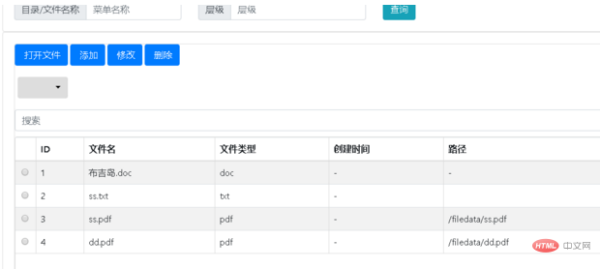
1、清理下浏览器缓存就行了
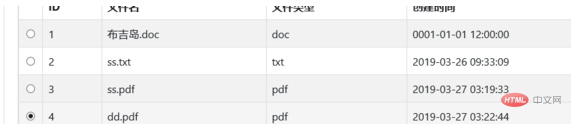
2、JSON数据格式不对(正确数据应该是json对象数据,并且格式要同下面)其实是因为bootstraptable接收的数据格式,即便是json格式的也不一定能显示
total是大概有多少条,rows才是bootstraptable接收的数据,按照这样的格式,然后就是
{
    "total": 5,
    "rows": [
        {
            "fileid": "0e41f912f62248dfa172c7ae7561a013",
            "filename": "2.doc",
            "filetype": "doc",
            "path": "/filedata/2.doc",
            "CreateDate": "2019-06-10 03:10:05",
            "menuid": null
        },
        {
            "fileid": "207e76db0e444d77b1502c826446e5b0",
            "filename": "新建文本文档.txt",
            "filetype": "txt",
            "path": "/filedata/新建文本文档.txt",
            "CreateDate": "2019-06-10 03:10:06",
            "menuid": null
        }
    ]
}
就算是这样,bootstraptable也是接收不了的,因为不是total而是count,不是rows而是data
{
    "errcode": 0,
    "errmsg": "ok",
    "count": 3,
    "data": [
        {
            "id": "f86c5d78-5092-433a-8fed-896742928a60",
            "title": "路德的物资采购申请",
            "flowid": "2599fae5-a2e0-4e4a-8f98-fcb4afd7292c",
            "flowname": "物资采购申请流程",
            "stepid": "ad940538-16be-4dc3-bfcb-a96a685b23cf",
            "instanceid": "2",
            "groupid": "c49d73b9-237d-470a-bbc0-027cbc49e664",
            "stepname": "采购部审核",
            "senderid": "eb03262c-ab60-4bc6-a4c0-96e66a4229fe",
            "sendername": "路德",
            "receivetime": "2019-06-12 15:01",
            "completedtime": "",
            "status": 0,
            "note": ""
        },
        {
            "id": "72c06559-0fcd-4a0a-85e3-db56a7ae1258",
            "title": "路德的物资采购申请",
            "flowid": "2599fae5-a2e0-4e4a-8f98-fcb4afd7292c",
            "flowname": "物资采购申请流程",
            "stepid": "e2f98fad-47ca-46f3-9b0c-2a0634240b72",
            "instanceid": "2",
            "groupid": "c49d73b9-237d-470a-bbc0-027cbc49e664",
            "stepname": "财务审核",
            "senderid": "eb03262c-ab60-4bc6-a4c0-96e66a4229fe",
            "sendername": "路德",
            "receivetime": "2019-06-12 15:01",
            "completedtime": "",
            "status": 0,
            "note": ""
        },
        {
            "id": "338a5b6d-f3f3-4884-816f-edf8eda65f65",
            "title": "路德的物资采购申请",
            "flowid": "2599fae5-a2e0-4e4a-8f98-fcb4afd7292c",
            "flowname": "物资采购申请流程",
            "stepid": "c16bbe7b-e2a9-4b25-8192-3ece54950bef",
            "instanceid": "2",
            "groupid": "c49d73b9-237d-470a-bbc0-027cbc49e664",
            "stepname": "分管领导审核",
            "senderid": "eb03262c-ab60-4bc6-a4c0-96e66a4229fe",
            "sendername": "路德",
            "receivetime": "2019-06-12 15:01",
            "completedtime": "",
            "status": 1,
            "note": ""
        }
    ]
}
js的bootstraptable配置一定要对好
columns: [
                { field: 'selectItem', radio: true },
            {
                field: 'fileid',
                title: 'ID'
            }, {
                field: 'filename',
                title: '文件名'
            }, {
                field: 'filetype',
                title: '文件类型'
            },
            {
                field: 'CreateDate',
                title: '创建时间'
            },
            {
                field: 'path',
                title: '路径'
            },
            {
                field: 'operate',
                title: '操作',
                formatter: operateFormatter //自定义方法,添加操作按钮
            },
            ]
3、bootstrap table的js配置没有写对
标签: